ChainDeploy is the open-source binary (Apache 2.0); ChainLaunch is the paid managed cloud product built on top of it.
FabricX (also written Fabric-X or Hyperledger Fabric X), the next-generation Hyperledger Fabric architecture, replaces the monolithic peer with independently scalable microservices and swaps Raft consensus for Arma BFT. Initial benchmarks from the Linux Foundation Decentralized Trust (April 2026) clock the Fabric-X ordering service at 400,000+ TPS with a 4-party, 4-shard deployment. That throughput unlocks workloads classic Fabric never could touch: high-frequency tokenization, real-time payments, and market-data ledgers.
The catch is that the setup is genuinely hard. A working 4-party network needs sixteen orderer-group microservices, four committers, mutual TLS everywhere, an Arma genesis block, and a Postgres database reachable from every committer over a shared Docker bridge network. All of that has to be wired up correctly before the first transaction.
chaindeploy v0.4.0 (May 2026) automates the entire wiring with a single command. Postgres-bridge auto-attach. Local-dev mode baked into the genesis block rewrite. Cert generation, namespace creation, Prometheus scrape config — all of it. The whole pipeline runs from a CLI command or a Quick Start wizard click, in roughly five minutes end-to-end.
TL;DR: Run chainlaunch fabricx quickstart --network-name demo --parties 4 and chaindeploy v0.4.0 provisions a complete 4-party Arma BFT FabricX network — 4 organizations, 4 orderer groups (16 microservices), 4 committers, shared Postgres, Docker bridge attach, genesis block, and node joins — in under five minutes. Same architecture as the 400,000+ TPS benchmark (Linux Foundation Decentralized Trust, 2026), on your laptop.
If you're new to FabricX itself, our What Is Fabric-X guide covers the architecture changes. If you want the release-notes view of what's new in chaindeploy v0.4.0, the Fabric-X GA post has the full changelog. This post is the hands-on companion: what the one-command quickstart actually does, screen by screen.
Prerequisites: A laptop or VPS with Docker (Desktop on macOS/Windows, native engine on Linux) and roughly 8 GB of free RAM. The chaindeploy binary is a single file — curl -fsSL https://chainlaunch.dev/deploy.sh | bash installs it. If you want a hosted setup instead, our installing ChainLaunch on a Hetzner VPS with deploy.sh walkthrough takes a clean Ubuntu box to a TLS-secured dashboard in under 5 minutes.
If you ran an earlier FabricX beta on chaindeploy, three things in v0.4.0 are worth knowing about before you re-run the quickstart.
Postgres-bridge auto-attach is now automatic. The committer's query-service exposes a Postgres-compatible read endpoint per namespace, which means every committer container needs to be on the same Docker bridge network as the shared Postgres database. In the beta you had to run docker network connect between each committer and the Postgres bridge as a post-step. v0.4.0 bakes that attach into the provisioning pipeline. Zero manual docker network commands.
Local-dev mode is baked in. The genesis block needs to encode reachable orderer endpoints. On macOS or Windows running Docker Desktop, containers can't reach 127.0.0.1 of the host — they reach host.docker.internal. The CHAINLAUNCH_FABRICX_LOCAL_DEV=true environment variable (or the Quick Start form's Local development mode checkbox) rewrites the genesis block accordingly. On native Linux, leave it unset.
Linux arm64 ships. Graviton, Ampere, and Raspberry Pi clusters get a first-class binary alongside darwin-amd64, darwin-arm64, and linux-amd64. No more building from source for ARM hosts.
Backup credentials are encrypted at rest. S3 keys, EBS credentials, and VMware vCenter logins in the SQLite database are now AES-encrypted with the same key chaindeploy uses for organization signing keys. If plaintext credentials were the holdup on configuring backups, the holdup is gone.
chaindeploy v0.4.0 (May 2026) moves Fabric-X support from beta to GA. The four operationally meaningful changes are postgres-bridge auto-attach, baked-in local-dev mode for Docker Desktop, a linux-arm64 release artifact, and AES-encrypted backup credentials at rest. Full release notes at the GitHub release.
Free resource
87% of Blockchain Projects Die Before Production — Readiness Scorecard
Score your project across 5 dimensions: infrastructure, key management, monitoring, DR, and team readiness. Know exactly where the gaps are before they kill your timeline.
The chaindeploy FabricX quickstart provisions a complete 4-party Arma BFT committee in a single CLI command (or wizard click). Each party runs its own orderer group of 4 microservices — router, batcher, consenter, assembler — plus a committer node, plus one shared Postgres container. A single-MSP quickstart totals roughly 22 containers (16 orderer-group + 5 committer + 1 Postgres); multi-MSP mode is closer to 37 because each party gets its own committer instead of sharing one. The topology matches the FabricX integration tests shipped in pkg/nodes/fabricx/fabricx_integration_test.go. Compare that to the classic Fabric Raft ceiling of around 3,500 TPS (ACM, 2024), and the architectural payoff becomes clear.
I've stood up FabricX networks the manual way — generating certs with cryptogen-x, hand-rolling Arma genesis configs, writing docker-compose files for 17 services. It's a full afternoon of YAML if everything goes right, longer if it doesn't. The quickstart compresses that into a form you fill out in 30 seconds.
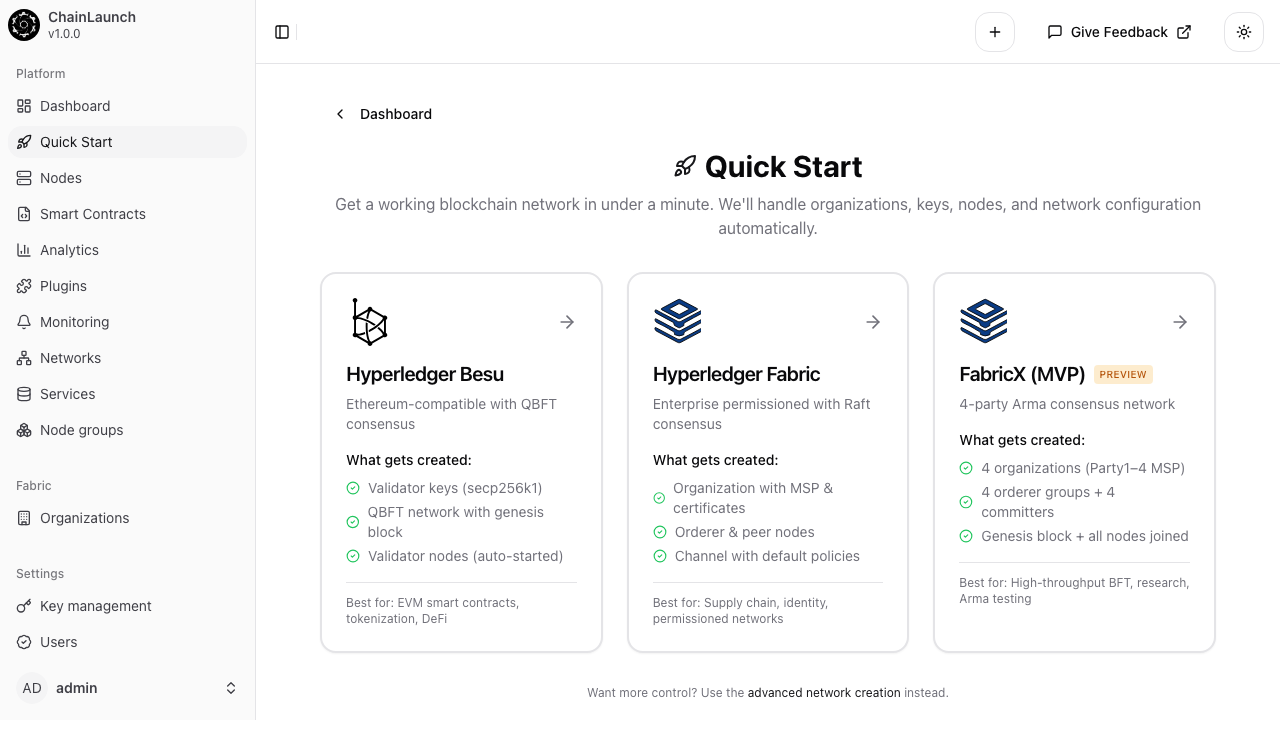
Here's the sidebar Quick Start view in chaindeploy, with cards for Hyperledger Besu, classic Hyperledger Fabric, and FabricX (MVP) marked PREVIEW:
The FabricX card spells out exactly what gets created: 4 organizations (Party1–Party4 MSP), 4 orderer groups + 4 committers, and a fully formed genesis block with all nodes joined. No optional steps, no manual cert wrangling.
Two paths, same result. According to the Hyperledger Foundation's 2025 Annual Report, Fabric remains the most-deployed enterprise blockchain framework at over 35% of permissioned networks — and FabricX is positioned as the throughput-focused successor most enterprises will eventually migrate to.
# macOS / Windows Docker Desktop only:export CHAINLAUNCH_FABRICX_LOCAL_DEV=truechainlaunch fabricx quickstart \ --network-name my-fabricx \ --parties 4 \ --mode single
The CLI exits non-zero on failure, supports --clean to wipe a prior bundle of the same name, has retry logic baked in for Docker bind-mount cache races, and is part of the documented v0.4.0 API contract (flags will not break in a 0.4.x patch). This is what CI pipelines and provisioning scripts should use. Full flag reference lives in the CLI docs.
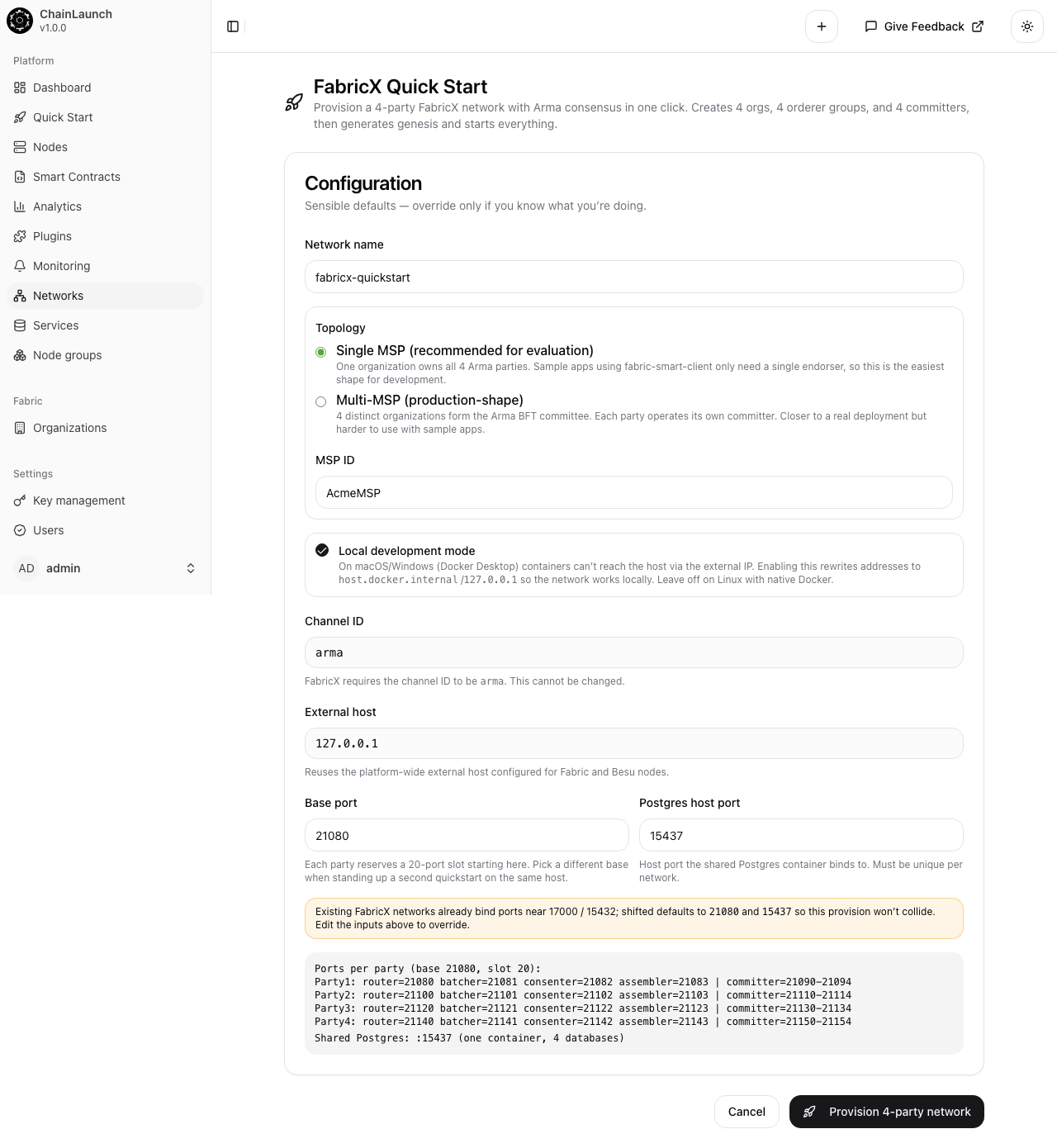
Click the FabricX card on the Quick Start dashboard at http://localhost:8100, or navigate directly to /networks/fabricx/quickstart. The quickstart page presents a single, opinionated form:
Three decisions to make:
Network name — defaults to fabricx-quickstart. Pick something memorable; this becomes the directory name on disk.
Topology — Single MSP or Multi-MSP. Single MSP means one organization owns all 4 Arma parties (easiest for development). Multi-MSP means 4 distinct organizations form the BFT committee (closer to production).
Local development mode — leave checked on macOS or Windows with Docker Desktop. It rewrites the genesis block to use host.docker.internal so containers can reach each other.
The base port (default 21080) and Postgres host port (15437) are pre-filled to avoid collisions with classic Fabric peers running on standard ports. Click Provision 4-party network and chaindeploy executes the entire pipeline.
chaindeploy's FabricX quickstart enforces the canonical 4-party Arma committee shape because BFT consensus requires f = (n-1)/3 faulty parties tolerated. With 4 parties, the network survives 1 byzantine failure — the minimum for byzantine fault tolerance. Per the Hyperledger Foundation (2024) survey, 61% of enterprise blockchain deployments now run BFT consensus in production, up from 38% in 2022 (full breakdown in our consensus mechanisms comparison).
For each of the 4 parties, chaindeploy runs five stages: organization creation, orderer-group provisioning, committer provisioning, network genesis, and node-join. The same pipeline, executed manually, takes most teams days to weeks (IDC FutureScape, 2024) — and only 25% of blockchain proofs-of-concept ever reach production, with operational complexity cited as the top failure mode.
Here's the actual sequence chaindeploy runs, distilled from the quickstart source at chaindeploy/web/src/pages/networks/fabricx/quickstart.tsx:
Ensure organizations exist — Party1MSP through Party4MSP (or a single AcmeMSP for single-MSP mode). Generates root and TLS certs with EC P-256 keys.
Create orderer groups (stage 1) — for each party, certs and configs generated, but containers not started yet. Each group includes router, batcher, consenter, and assembler microservices.
Create committer nodes (stage 1) — Postgres database + committer process per party. Certs generated, no containers running.
Create the FabricX network — produces the Arma-consensus genesis block, encoding all 4 orderer groups, all 4 committers, channel name (arma), and on-chain namespace policies.
Join each node and attach to the Postgres bridge — writes the genesis block to each node's data directory, attaches every committer to the shared Docker network with the Postgres container, then starts the containers in dependency order. A single-MSP run lands at roughly 22 containers Up; multi-MSP at roughly 37.
Endorsement in FabricX is handled by token-sdk-x, not by chaindeploy-managed nodes. The quickstart provisions orderer groups + committers only — the endorser layer is your responsibility.
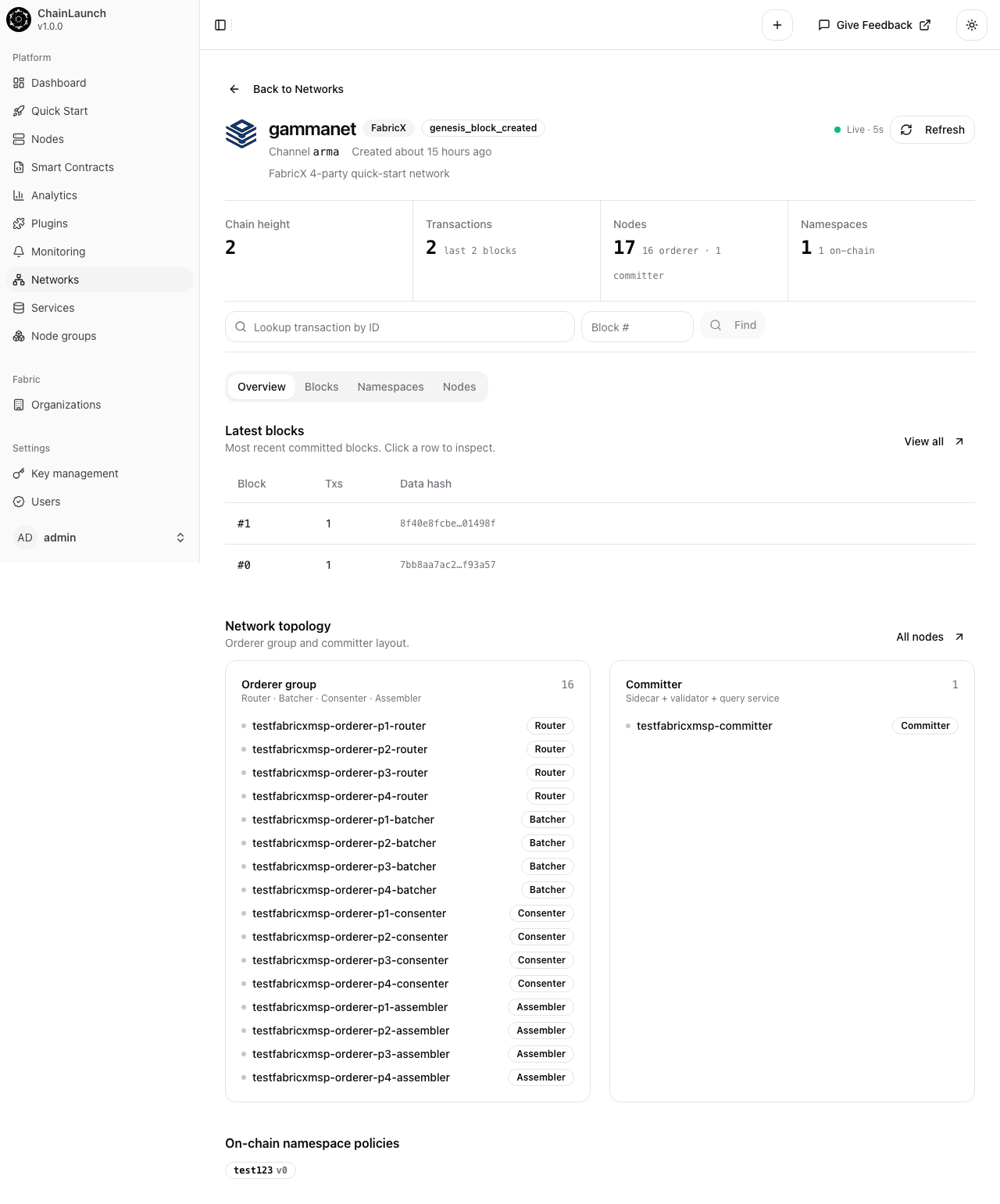
Once provisioning completes, you land on the network detail page. Here's what gammanet (one of my test networks) looks like:
The summary tiles tell the story at a glance: chain height, transaction count, total nodes broken down by role, and namespace count. The network topology section below lists every orderer-group microservice (router, batcher, consenter, assembler — 4 of each, one per party) plus the committer.
The 5-stage provisioning pipeline (ensure orgs → orderer groups → committers → network genesis → join nodes + bridge attach) is identical for CLI and web UI invocations. Stages are idempotent — a failed run can be re-invoked with --clean to wipe partial state or without it to resume. Source at chaindeploy/web/src/pages/networks/fabricx/quickstart.tsx.
Free resource
87% of Blockchain Projects Die Before Production — Readiness Scorecard
Score your project across 5 dimensions: infrastructure, key management, monitoring, DR, and team readiness. Know exactly where the gaps are before they kill your timeline.
FabricX collapses classic Fabric's multi-channel isolation into a single channel with on-chain namespaces. According to the Linux Foundation Decentralized Trust (April 2026), this single-channel-with-namespaces model is what lets the Fabric-X ordering service hit sustained throughput of 100,000+ TPS at sub-2-second end-to-end latency — multi-channel topologies couldn't share Arma's batched consensus pipeline efficiently.
A namespace is a cryptographic boundary inside the channel. Each namespace has its own submitter organization, its own chaincode binding, and its own access policy. Two namespaces in the same FabricX channel can't read or write each other's state — same isolation guarantee classic Fabric used separate channels to provide, but without the operational overhead of running separate orderer sets per channel.
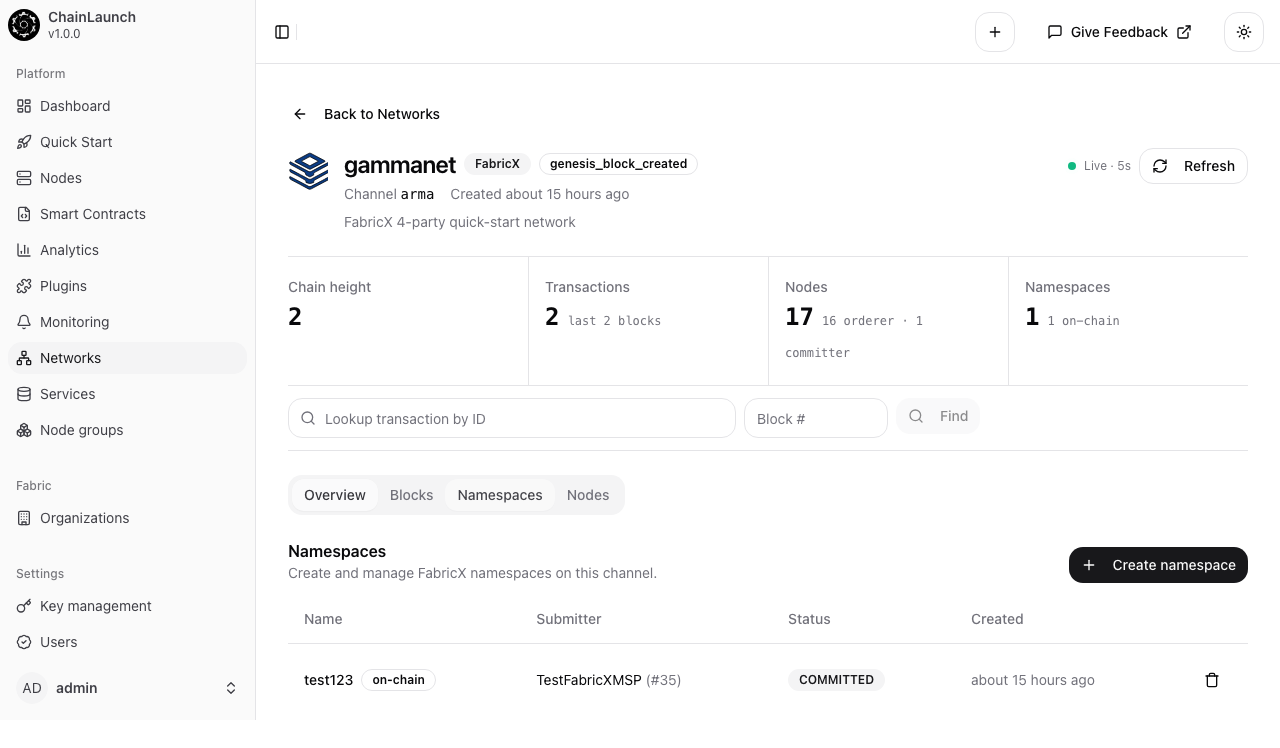
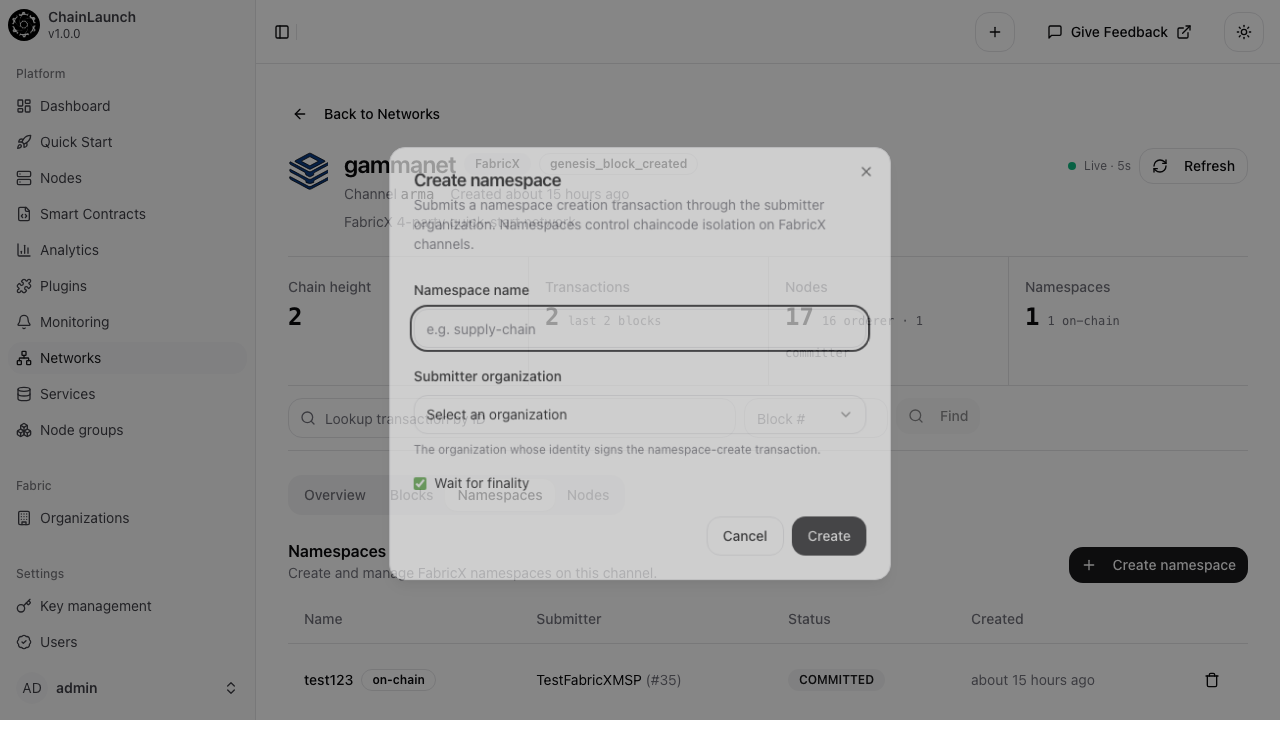
To create a namespace, click the Namespaces tab on a FabricX network detail page:
The list shows every namespace on the channel, with submitter org, on-chain status, and creation timestamp. Click + Create namespace to launch the create dialog:
Three fields:
Namespace name — lowercase, hyphenated. Becomes part of every state key written under this namespace (e.g., supply-chain/asset:abc123).
Submitter organization — picks the MSP whose identity signs the namespace-create transaction. Only that org's clients can later add chaincode bindings to this namespace.
Wait for finality — checked by default. The dialog stays open until Arma consensus commits the create-namespace transaction across all 4 parties.
Click Create. chaindeploy submits the namespace-create envelope through the chosen organization's signing identity, the Arma orderer batches and orders it, and within a couple of seconds the new namespace appears in the list with status COMMITTED.
The 4-party quickstart network is meant for development, integration tests, and benchmarking — not production. According to enterprise blockchain market research (2025), the enterprise blockchain market is projected to reach $145.9 billion by 2030 at a 47.4% CAGR — and FabricX is positioned to capture the high-throughput slice that classic Fabric can't reach.
Three concrete next steps once your network is up:
Wire up token-sdk-x — FabricX relies on token-sdk-x for endorsement. Point it at the 4 orderer routers (default ports 20000, 20100, 20200, 20300) and the 4 committers. The fabric-smart-client sample apps work against single-MSP setups out of the box.
Create per-workload namespaces — instead of running one monolithic chaincode, split your domain into namespaces (e.g., payments, supply-chain, kyc). Each namespace gets independent access policies and chaincode bindings, while sharing the channel's Arma ordering throughput.
Stress-test against the quickstart shape — once your namespaces are wired, hammer the network with the load generator that ships with fabric-smart-client. The 4-party shape is the same one used in IBM Research's Arma paper, so your numbers stay comparable to published benchmarks.
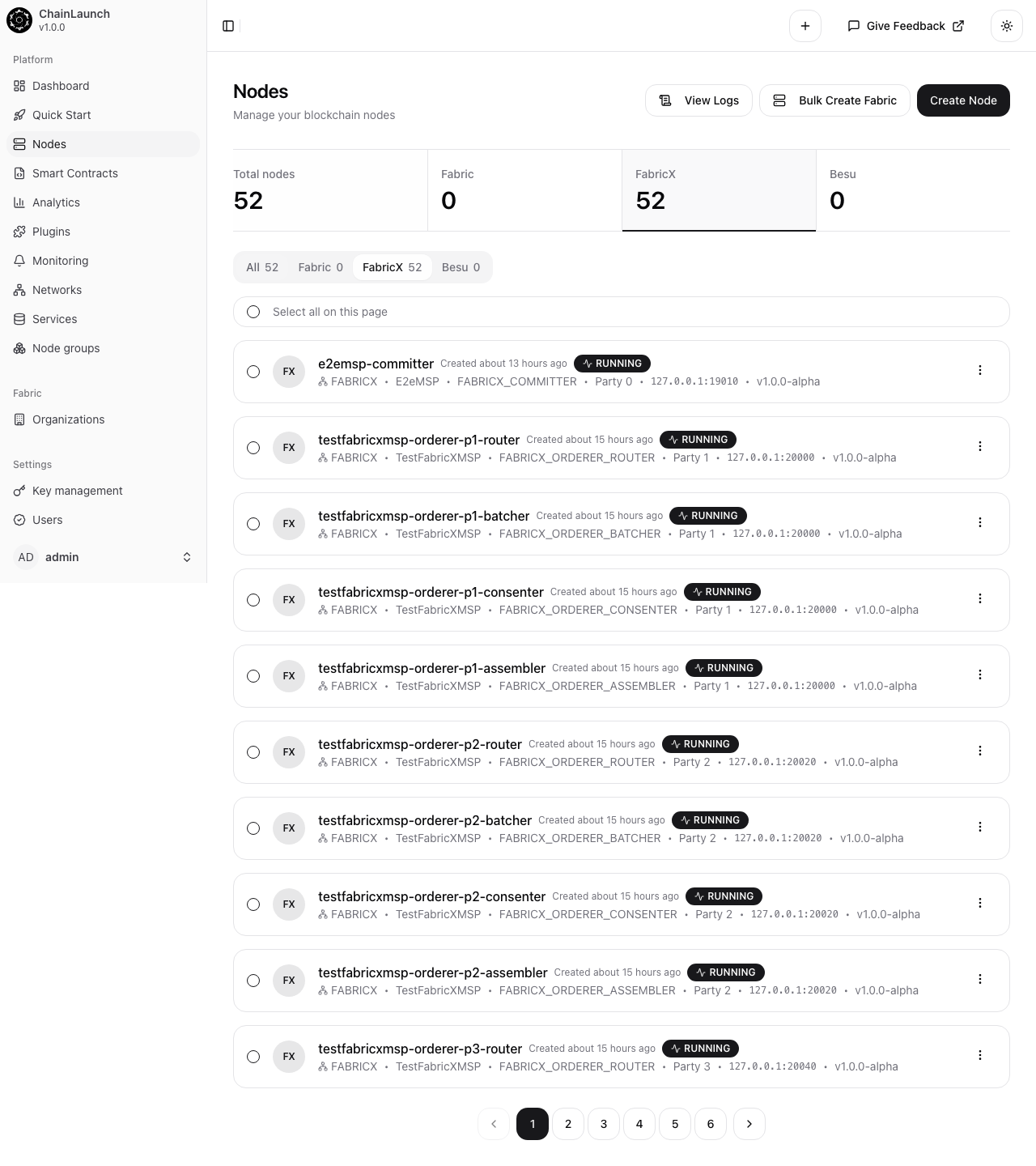
You can see all FabricX nodes across networks from the chaindeploy nodes page, filtered to the FabricX tab:
Every node carries a status pill (RUNNING in green), its party number, MSP, role, and host port. Click any node for logs, container details, or to stop/restart.
FabricX decomposes the monolithic Fabric peer into separate microservices (router, batcher, consenter, assembler, committer), replaces Raft consensus with Arma BFT, and uses on-chain namespaces instead of multi-channel isolation. Classic Fabric peaks around 3,500 TPS on Raft; FabricX has been benchmarked at 400,000+ TPS with 4 parties and 4 shards (Linux Foundation Decentralized Trust, 2026).
FabricX is in MVP/preview state — chaindeploy explicitly labels its quickstart card "PREVIEW". The Hyperledger Foundation incubates it alongside classic Fabric, and the April 2026 roadmap targets ultra-scalability use cases. Use it today for development, benchmarking, and pilots — not yet for regulated production workloads where classic Fabric remains the safer choice.
Arma BFT requires at least 3f + 1 nodes to tolerate f byzantine failures. Four parties is the smallest committee that survives one byzantine failure — the minimum for meaningful BFT. The Hyperledger Fabric-X paper (2026) reports peak throughput at 4 parties with 4 shards, making this shape both the minimum-viable and the throughput-optimal configuration for evaluation.
Yes. Uncheck Local development mode on the quickstart form (or omit CHAINLAUNCH_FABRICX_LOCAL_DEV=true from your CLI environment). With it unchecked, chaindeploy uses your machine's external IP in the genesis block instead of host.docker.internal. On Linux, where containers can reach the host directly, this is the correct setting. On macOS or Windows running Docker Desktop, set the env var or check the box.
No, not in chaindeploy v0.4.0 or later. The earlier beta required docker network connect between every committer and the Postgres bridge as a manual post-step. The v0.4.0 provisioning pipeline attaches every committer to the shared Docker network automatically. If you're following older guides that include docker network connect steps, you can skip them.
All three are correct and used interchangeably by the community. The Linux Foundation Decentralized Trust documentation prefers Fabric-X (hyphenated). chaindeploy's CLI and UI use the unhyphenated fabricx token (e.g., chainlaunch fabricx quickstart). The official long-form name is Hyperledger Fabric X. Tag your blog posts and search for whichever you prefer.
A single-MSP 4-party quickstart fits comfortably on a 16 GB laptop with roughly 22 containers up — about 6-8 GB of resident memory under idle load, leaving room for the chaindeploy binary itself, your editor, and a browser. Multi-MSP mode is closer to 37 containers and 10-12 GB. If you want to also run a token-sdk-x application against the network, plan for 16 GB usable to chaindeploy at minimum; 24 GB is more comfortable for active development.
The defaults are 21080 for the base orderer port range (4 router/batcher/consenter/assembler quadruplets allocated upward from there), 15437 for the shared Postgres host port, 8100 for the chaindeploy web UI, and 8101 for the API. Every port is configurable via CLI flag (--base-port, --postgres-port) or web UI form field, so chaindeploy can co-exist with chainlaunch-pro or other Fabric peers without colliding.
The CLI accepts --parties N for any N where (N - 1) % 3 == 0 — so 4, 7, 10, etc. The Arma BFT model needs 3f + 1 parties to tolerate f Byzantine failures, and 4 is both the minimum and the published-benchmark shape. Larger committees increase fault tolerance but also coordination overhead; the LF Decentralized Trust roadmap benchmarks use 4 parties with 4 shards as the throughput-optimal configuration.
Each namespace acts as an isolation boundary for one or more chaincodes. The submitter organization signs the namespace-create transaction, then binds chaincode definitions to the namespace via separate transactions. Reads and writes against state keys within a namespace are isolated from other namespaces — the same effect as classic Fabric's multi-channel pattern, without the operational cost of running separate orderer sets per channel.
The chaindeploy FabricX quickstart turns a multi-hour manual setup into a 60-second click. You get a complete 4-party Arma BFT network with all 17 microservices wired correctly, a genesis block already on disk, and a UI for creating namespaces against the running channel. That's the same network shape used in IBM Research's Arma benchmarks, the same shape pkg/nodes/fabricx/fabricx_integration_test.go exercises, and the same shape you'd ship to a staging environment.
Three things to do next:
Walk through the quickstart yourself at localhost:3100/networks/fabricx/quickstart after chainlaunch serve
Compare the throughput your laptop hits against the Arma published benchmarks — even a quickstart deployment runs the real Arma consensus, so the numbers are honest
If you're still picking between FabricX and classic Fabric, our Hyperledger Fabric vs Besu comparison and What Is Fabric-X guide lay out the trade-offs. If you want to see the quickstart turned into a domain-specific consortium with five organizations and private settlement, the Fabric-X insurance demo walks through a 5-org P&C reinsurance network end to end.
Free resource
87% of Blockchain Projects Die Before Production — Readiness Scorecard
Score your project across 5 dimensions: infrastructure, key management, monitoring, DR, and team readiness. Know exactly where the gaps are before they kill your timeline.
We publish when we have something worth saying — tutorials, cost breakdowns, and production lessons from real deployments.
Work email only · Unsubscribe anytime
From the founder
Skip weeks of setup — get to production in minutes.
Most teams spend weeks on infrastructure before writing a single line of business logic. Book a call and I'll show you how ChainLaunch cuts that to minutes — and whether it's the right fit for your project.